
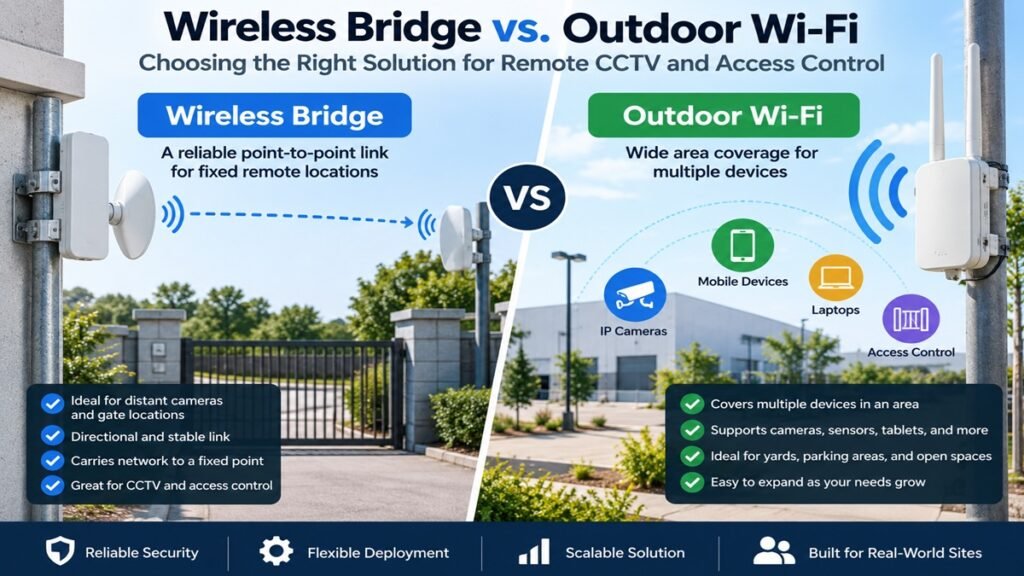
Wireless Bridge vs. Outdoor Wi-Fi: Choosing the Right Solution for Remote CCTV and Access Control
When a remote camera, gate controller, guard room, or parking area is difficsult to cable, use a wireless bridge to carry a network connection to one fixed remote location, and use outdoor Wi-Fi when several devices need service across an area. Treating them as interchangeable can leave cameras offline or access events delayed.
For small businesses and property projects, the choice also determines where power is needed, how easily the site can expand, and how predictable the connection is in daily operation.
1. Start With the Network Job, Not the Product Name
1.1 A wireless bridge is a fixed network link between two places
A wireless bridge is an Ethernet cable replacement across a gap. Two radio units at known points form a point-to-point link; the remote end can feed a camera, PoE switch, access controller, or small local network.
It fits a static remote device when the cable route is unsuitable: a perimeter camera, guard post across a driveway, entry gate, or separate building.
The important distinction is that the bridge is normally a backhaul. It transports the network from A to B. It is not primarily intended to provide general Wi-Fi service to phones, tablets, and roaming devices around the remote site.
1.2 An outdoor access point creates a client coverage area
An outdoor Wi-Fi access point broadcasts a Wi-Fi network for multiple clients. It is useful when devices are spread around a yard, loading bay, car park, farm area, or residential common space.
An outdoor AP can support cameras, mobile guard devices, maintenance tablets, sensors, and approved visitor devices. It lets another device join within the usable area without another dedicated link.
Client distance, walls, foliage, vehicle movement, radio congestion, and client radios all affect the result. Do not design from an AP range claim alone.
2. Wireless Bridge vs. Outdoor Wi-Fi at a Glance
| Decision factor | Wireless bridge | Outdoor Wi-Fi access point |
|---|---|---|
| Primary role | Connect a fixed source and a fixed remote site | Provide Wi-Fi service to multiple client devices in an area |
| Radio pattern | Usually directional, focused between endpoints | Usually broader local coverage, depending on antenna design |
| Best device position | A known camera pole, gate, guard room, or outbuilding | Cameras, sensors, tablets, and phones distributed around a site |
| Client access | The remote device normally connects by Ethernet after the bridge | Wi-Fi-capable clients join the AP directly |
| Planning priority | Clear path, alignment, mounting stability, and backhaul capacity | Coverage map, client density, roaming needs, and interference |
| Expansion approach | Add a remote switch or build additional planned links | Add or reposition APs as coverage and client count grow |
| Common mistake | Expecting it to serve a broad local Wi-Fi zone | Trying to use broad coverage as a reliable long-distance building-to-building link |
A bridge can be efficient for one distant endpoint but awkward for five cameras in different directions. An AP may simplify a small open area but is not automatically a sound link to a distant guardhouse.
3. Which Solution Fits Common CCTV and Access-Control Scenarios?
3.1 A camera at a distant gate or perimeter pole
For one or a few cameras at a gate, a bridge is often the cleanest design. Install a bridge endpoint at the main building and another at the gate-side cabinet or pole. At the remote end, a PoE switch or injector can supply the camera and, where needed, an access controller or intercom.
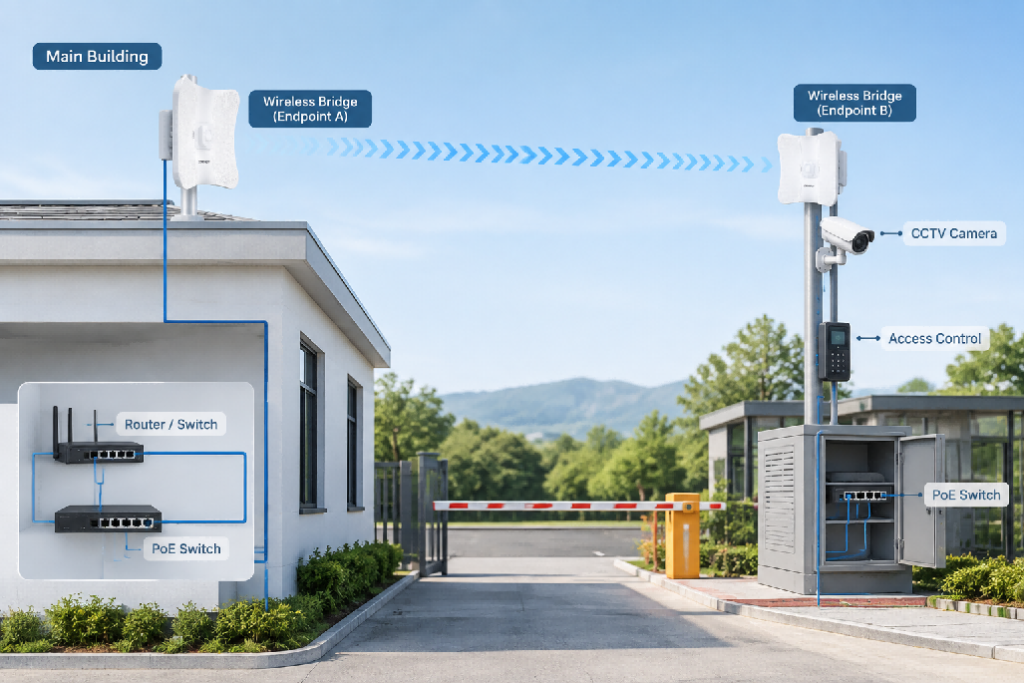
This keeps the camera on a wired connection after the wireless hop and gives the installer a defined path to inspect: source Ethernet, first bridge, radio path, second bridge, then remote equipment.
For projects where the route is long and the endpoints are fixed, a category such as 5.8GHz 900Mbps wireless bridges is relevant for evaluating dedicated point-to-point backhaul options. The actual choice should still be based on local spectrum, regulatory requirements, mounting positions, and the number of video streams expected at the remote end.
3.2 A car park with cameras, staff tablets, and vehicle sensors
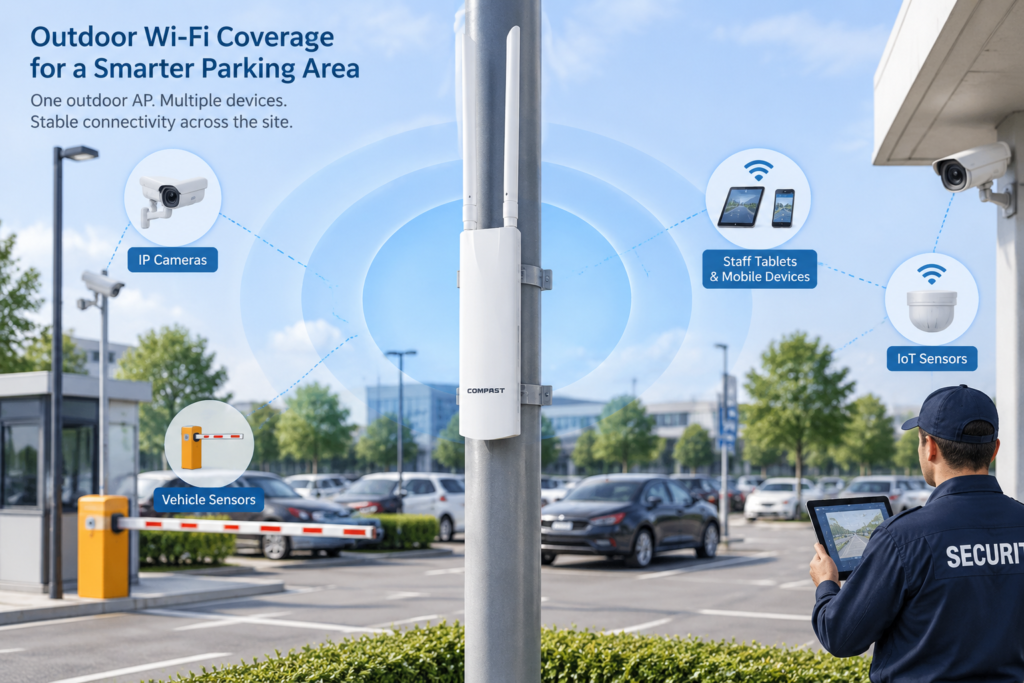
A car park may have cameras at entrances and lanes, staff handhelds, and sensors or payment terminals. If they lie within a practical coverage area, an outdoor AP can be the more adaptable base layer.
Place the AP where it has the clearest view of the target area, not where installation is simply easiest. A device behind a metal sign, inside a steel cabinet, or blocked by vehicles may behave very differently from a phone in open space.
Readers planning multi-device outdoor service can review outdoor wireless access points as the relevant equipment category. Use the category only after defining client count, area shape, obstructions, and whether the remote site also needs a separate wired backhaul.
3.3 A guard room in another building
Two buildings on the same site are a classic bridge scenario. If the office has the network video recorder and the guard room needs cameras, an intercom, and a workstation, a bridge can carry the cross-site connection and a small switch can distribute Ethernet.
If guards also need Wi-Fi inside or around that building, do not force the bridge to do both jobs. Treat the bridge as the backhaul and add an AP at the destination for local client access. This division makes future changes easier. The link can be checked separately from the Wi-Fi coverage, and a change to the local SSID does not have to affect the inter-building connection.
3.4 A farm, construction site, or temporary location
Remote sites may lack stable mains power, have moving obstructions, or change layout. A bridge can work between stable mounting points, while outdoor Wi-Fi can add flexibility around a temporary hub if it has reliable upstream connectivity and power.
Identify what will remain in place for the project duration. Fixed poles or roofs make good bridge endpoints. Do not put a critical security path on a device likely to move, be blocked, or be switched off each day.
4. Site Conditions That Can Change the Decision
4.1 Line of sight is more than seeing the other building
For a bridge, a visually clear path is only the starting point. Trees that grow leaves seasonally, trucks parked in a loading lane, new signage, cranes, and water tanks can impair or intermittently block a radio path. The endpoints should also be mounted rigidly; a small movement can matter when a directional antenna is aimed across a long gap.
Outdoor Wi-Fi is less dependent on a single narrow path, but its signal still has to reach the client and return from it. A high-powered AP does not remove the limitation of a weak client radio. Plan for the two-way link, especially for battery-powered cameras and small access-control devices.
4.2 Coverage maps beat casual range estimates
An outdoor AP should be located according to usable service, not advertising distance. Walk the space, identify camera and reader positions, note walls and metal structures, and consider how the site changes when vehicles are present. In a car park, a camera mounted near a lane may have a very different radio environment during peak hours than during installation.
For bridges, validate the path before final mounting and leave access for future alignment checks. It is often worth planning a safe test mount or temporary survey position before drilling permanent brackets.
4.3 Power, cable length, and protection are part of the wireless design
Wireless hardware still needs wired power and Ethernet at its endpoints. PoE can simplify installation by carrying power and data over one cable, but the switch or injector must have adequate power capacity for every connected device. The familiar 100 m Ethernet channel limit is also a planning boundary, not a challenge to ignore with an arbitrary longer cable run.
For outdoor equipment, use cable and connectors suitable for the environment. Add appropriate surge protection and grounding in line with local electrical and installation rules, particularly for devices mounted on tall poles or exposed structures. Keep power adapters, switches, and network video equipment in protected enclosures where required.
5. Separate the Security Network From General Wi-Fi
5.1 Why network separation matters
Security cameras and door controllers have predictable but important traffic. A visitor uploading video over guest Wi-Fi, or a staff device infected with malware, should not be able to compete with or directly reach security equipment. Separate SSIDs, VLANs, firewall rules, and switch ports can reduce this risk when the rest of the network supports them.
At a minimum, identify which traffic belongs to cameras, access control, management devices, staff, and guests. Do not connect a remote camera to a general-purpose outdoor SSID merely because the signal appears available. Use strong credentials, change default device accounts, and limit management access to authorised devices or subnets.
5.2 Plan for failure and maintenance
A remote system needs a way to be checked without sending a technician to every pole. Record bridge endpoint names, IP addresses, switch ports, PoE power use, antenna directions, cabinet keys, and the physical location of reset controls. If a bridge serves several cameras through a remote switch, make sure the monitoring system can distinguish an upstream link failure from a single camera failure.
Keep a small amount of spare cable and a documented replacement path for exposed hardware. This is more useful than assuming a single wireless device will never need adjustment after storms, construction work, or site expansion.
6. Use a Hybrid Design When the Site Needs Both
Many projects do not require a strict either-or decision. A bridge can carry the network to a remote zone, while an outdoor AP at that zone serves several local devices. For example, a warehouse can bridge connectivity to a perimeter gate cabinet, then use an AP there for a mobile patrol device and two nearby wireless sensors. Fixed cameras can remain wired to the remote PoE switch.
This approach has a practical advantage: each layer has one clear responsibility. The bridge handles distance. The switch handles local wired distribution and power. The AP handles client coverage. When a problem occurs, the installer can test each layer without guessing which function a single all-purpose radio was expected to perform.
Do not overbuild a small site, however. A single camera 40 metres from a building may be cheaper and simpler to cable than to support with two outdoor radios, mounting hardware, weatherproof terminations, power equipment, and maintenance access. Wireless earns its place when it avoids a genuinely difficult, expensive, or disruptive cable route.
7. Pre-Deployment Checklist
Before ordering equipment, confirm these points:
- Is the requirement one fixed remote endpoint or an area with multiple client devices?
- Can you identify stable mounting positions at both ends of a potential bridge path?
- What will obstruct the signal now, in bad weather, and after the site changes?
- Which devices will be wired locally, and which truly need Wi-Fi?
- Is there enough PoE power at every required location?
- Are all Ethernet runs within the standard channel length and protected for the environment?
- How will cameras, controllers, staff devices, and guests be separated on the network?
- Who can reach the equipment safely for alignment, resets, and maintenance?
- What local radio and electrical installation rules apply before the system is installed?
Conclusion
Wireless bridge versus outdoor Wi-Fi is not a contest between two versions of the same product. A bridge is the focused choice for moving a network connection across a difficult gap to a fixed destination. An outdoor AP is the flexible choice for serving several wireless clients across a defined local area. Begin with the physical layout and device locations, then select the architecture that gives each important connection a clear, supportable path.
For remote CCTV and access-control projects, a reliable design usually comes from separating the backhaul question from the coverage question. That makes the result easier to install, secure, expand, and troubleshoot.
FAQ
Can a wireless bridge connect more than one camera?
Yes. A bridge can carry the network to a remote switch, and that switch can connect multiple wired cameras or controllers. The design must account for the combined traffic, PoE power, and remote cabinet space instead of evaluating each camera in isolation.
Can an outdoor access point replace a wireless bridge?
Sometimes, but it is usually not the preferred choice for a fixed long-distance link between buildings. An AP is intended to serve clients over an area. Use it as a bridge substitute only after confirming that its operating mode, antenna pattern, endpoint radios, and actual site conditions support the required connection.
Is Wi-Fi suitable for access-control systems?
It can be suitable when the wireless path is designed and maintained properly, but access control is operationally important. Use network segmentation, secure credentials, protected power, and a plan for what happens if connectivity is interrupted.
