
Outdoor WiFi for CCTV Cameras A Practical Guide to Reliable Smart Monitoring
For most small outdoor monitoring projects, reliable connectivity comes from planning the coverage area, backhaul path, power, and network separation before choosing a camera. A standard indoor router rarely solves a distant gate, warehouse yard, farm entrance, or construction site. The right outdoor Wi-Fi design prevents dropped video, delayed alerts, and repeated site visits.
1. Why do outdoor monitoring systems lose connectivity?
1.1 Distance and obstruction change the radio path
Outdoor cameras are often placed where the risk is highest, not where Wi-Fi is easiest: at a rear gate, loading area, perimeter fence, shed, parking lot, or irrigation pump. A camera may be only 80 metres from the building in a straight line, but brick walls, metal cladding, delivery vehicles, trees, and shelving can weaken or reflect the signal. A connection that looks acceptable during installation can become unreliable after leaves grow, a truck parks in the path, or the door is closed.
Wi-Fi signal bars alone are not a deployment plan. A usable camera link needs enough signal margin for its video stream and retransmissions. When the link is weak, a camera may still answer a ping while its live view freezes or its recordings arrive with gaps.
1.2 Weather, power, and consumer hardware add failure points
Heat, humidity, water ingress, and wind all expose weaknesses in outdoor installations. Indoor repeaters and home routers are not designed for permanent exposure, while power adapters and loose connectors are frequent causes of unexplained camera outages. Long extension leads, overloaded outlets, and voltage drop can also make a network problem look like a Wi-Fi problem.
2. Start with the monitoring area, not the camera specification
2.1 Map every device and the path back to the network
Mark the camera, access-control, sensor, and recorder locations on a simple site sketch. Add the existing broadband entry point, network cabinet, available power points, and any buildings between them. Then ask two practical questions: must users roam with Wi-Fi throughout the area, or do only a few fixed remote devices need a connection?
For example, a warehouse yard with handheld scanners and cameras needs area coverage. A gate camera and a guard post across a road usually need a dedicated connection between two fixed points. These are different jobs and should not begin with the same hardware choice.
2.2 Check the line of sight at installation height
Walk the proposed route and look from the height at which the equipment will be mounted, rather than only from ground level. A roof edge, wall, branch, signboard, or steel beam can block the path even when the two sites seem visible from below. Also allow for seasonal change: a clear winter path through trees may not stay clear in summer.
Where a cable route is practical, Ethernet remains the most predictable option. Where trenching or crossing a driveway is too disruptive, a properly planned wireless connection can be more economical and easier to maintain.
3. Which connection method suits outdoor CCTV and smart devices?
3.1 Outdoor access points are for shared coverage areas
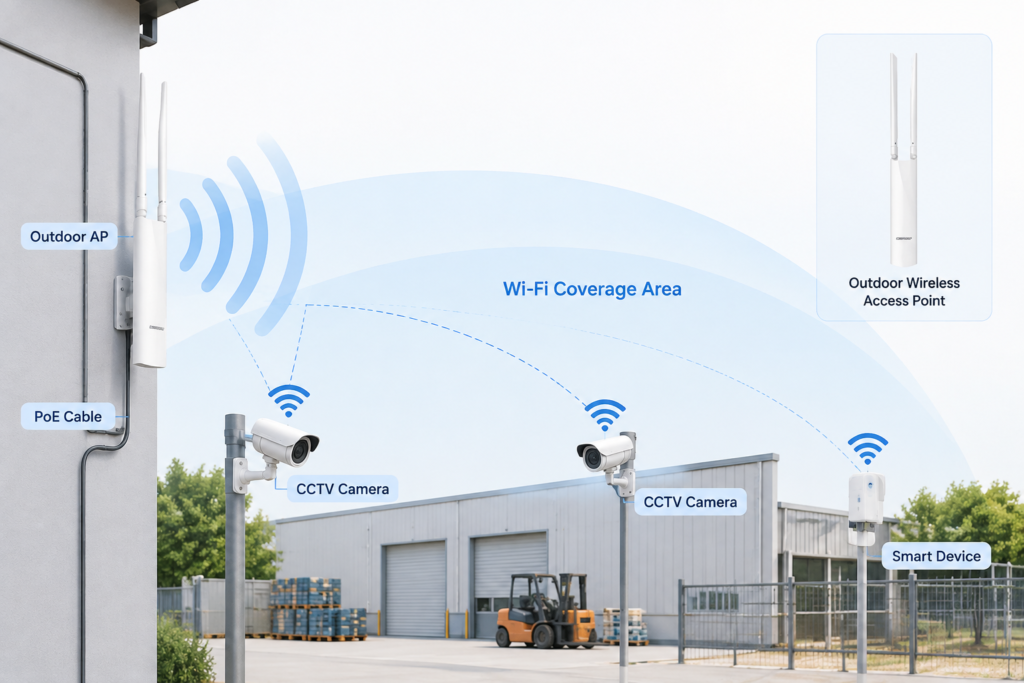
An outdoor access point distributes Wi-Fi across an area, making it suitable for camera clusters, loading bays, yards, farm buildings, outdoor seating, or residential common areas. It is most useful where several devices need to connect within the same zone, rather than at one far-away endpoint. Purpose-built outdoor wireless access points are the relevant category when coverage, weather resistance, and flexible mounting are part of the requirement.
Placement matters as much as the access point itself. Mount it high enough to reduce nearby blockage, but low enough for safe servicing. Aim directional equipment toward the working area, and do not place it behind metal fascia, inside a sealed cabinet, or directly beside large HVAC equipment.
3.2 A wireless bridge is for a few fixed remote points
A point-to-point wireless bridge creates a focused link between two fixed locations. It is usually the better fit for a camera at a gate, a small outbuilding, a guard booth, or a second warehouse when there is a clear path between both ends. The far-end camera or switch connects by Ethernet to the remote bridge, while the bridge carries traffic back to the main network.
Unlike broad Wi-Fi coverage, a bridge should not be treated as a general visitor network. Its job is to provide a stable backhaul for known devices. Alignment, line of sight, and secure mounting are therefore more important than trying to reach every corner of the property.
3.3 Cellular routers solve sites without fixed broadband
4G or 5G routers are practical for temporary sites, remote farms, mobile offices, and locations where fixed internet is unavailable. They can provide a fast deployment path, but they depend on local cellular coverage, an appropriate data plan, and an allowance for video traffic. Continuous high-resolution video can use far more data than owners expect.
| Connection method | Best use | Main advantage | Main limitation |
|---|---|---|---|
| Outdoor Wi-Fi access point | Shared yard, campus, farm, or exterior work area | Supports multiple nearby devices | Needs sensible coverage and backhaul planning |
| Point-to-point wireless bridge | Gate, guard post, second building, or remote fixed camera | Focused long-distance link | Requires clear alignment between endpoints |
| 4G/5G router | Temporary, remote, or no-broadband site | No fixed line required | Coverage and data costs can limit continuous video |
4. How should power and physical installation be planned?
4.1 Use PoE to simplify remote device power
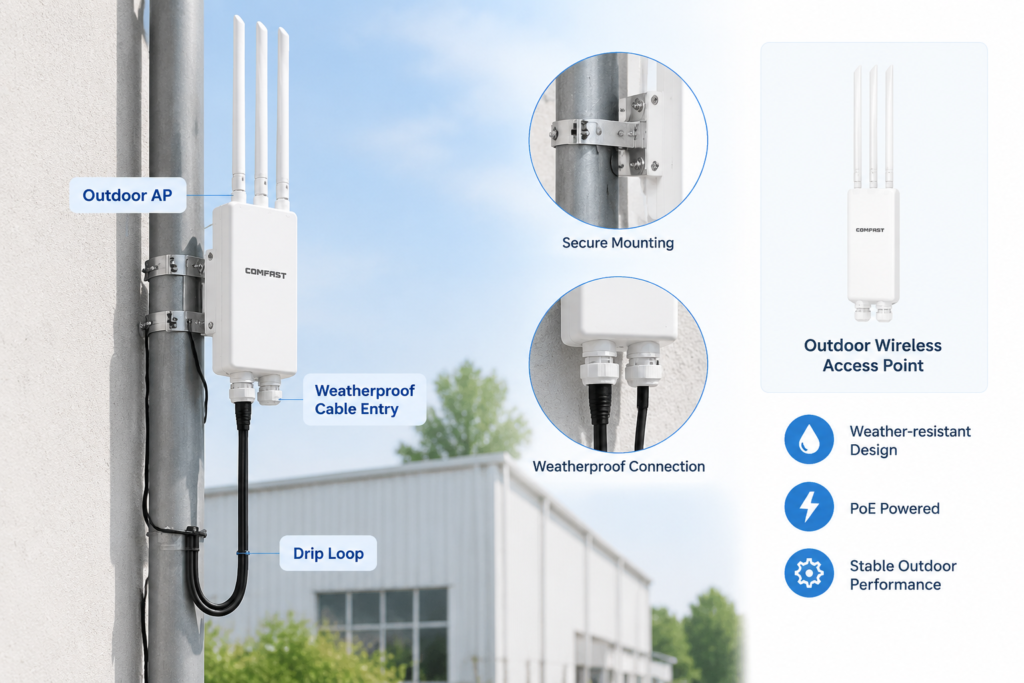
Power over Ethernet (PoE) can carry data and power over one suitable Ethernet cable. For a camera, access point, or bridge mounted on a pole or exterior wall, this often removes the need for a mains outlet at the device location. It also makes fault-finding simpler because the cable run, switch or injector, and endpoint can be checked as one path.
Confirm that the power source and endpoint use compatible PoE standards or the exact passive PoE method required by the equipment. Do not assume every PoE-labelled device works with every injector.
4.2 Protect against water, surge, and mounting errors
Choose enclosure and connector protection appropriate to the site, and arrange cables with a drip loop so water cannot run toward a port. Use outdoor-rated cable where exposure is unavoidable. On elevated outdoor runs, appropriate surge protection and grounding should follow local electrical practice and the equipment instructions; this is especially important in lightning-prone areas.
Avoid mounting radio equipment beside large metal surfaces or inside metal boxes. Secure the bracket so wind cannot slowly change the antenna direction. Label cables and record the mounting position and IP address before leaving the site.
Engineer tip: Before final drilling, power the equipment temporarily at the intended mounting position and test a live camera stream for at least 15 minutes. Checking only a speed-test result can miss packet loss that causes video stutter.
5. Why separate cameras from employee and visitor Wi-Fi?
5.1 Segmentation protects bandwidth and video reliability
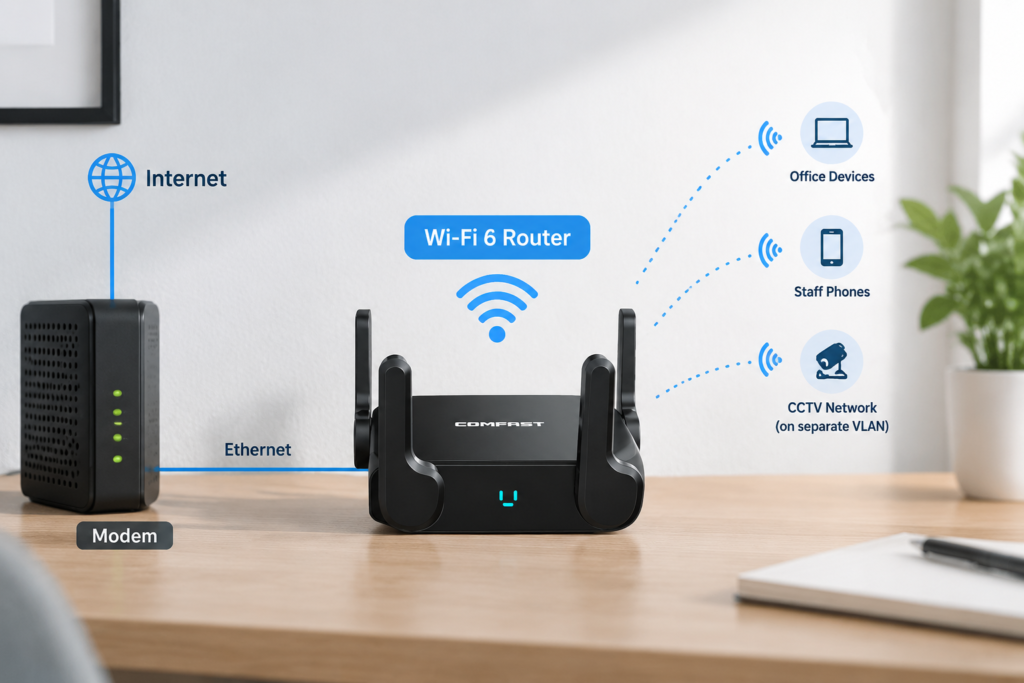
Cameras send traffic continuously, especially when several record high-resolution video or upload to a remote recorder. Guest phones, staff video calls, and automatic cloud backups can compete for the same wireless airtime and internet uplink. Separating monitoring devices into their own SSID or VLAN makes it easier to control access, prioritise traffic, and see whether a fault belongs to the camera network or the everyday office network.
For small sites, the separation can be straightforward: one network for cameras and management devices, one for staff, and one for guests. The router, switches, and access points must support the chosen design, and the rules should allow only the required paths between the camera network, recorder, and authorised management devices.
5.2 The main router still matters indoors
An outdoor system starts at the network core. A capable Wi-Fi 6 wireless router can serve the office-side network while the CCTV devices remain on a separate segment or wired PoE switch. This is useful when staff still need dependable indoor connectivity, but it should not be presented as a replacement for purpose-built outdoor coverage or a remote bridge.
Change default passwords, disable unused remote-management features, and keep firmware maintained. Security improves when an employee phone cannot automatically discover the camera management interface.
6. A simple pre-deployment checklist for outdoor monitoring
6.1 Confirm the network design before buying equipment
Use this checklist for each remote location:
- Distance: Measure the approximate cable route and wireless path, not only the map distance.
- Obstacles: Note walls, trees, metal structures, parked vehicles, and seasonal foliage.
- Connection type: Choose area coverage, a fixed wireless bridge, Ethernet, or cellular for a specific reason.
- Power: Identify PoE source, cable path, total power budget, and protection requirements.
- Bandwidth: Estimate simultaneous live views, recording bitrate, remote viewing, and internet upload capacity.
- Environment: Check the required weather, dust, temperature, and mounting protection.
- Security: Plan SSIDs or VLANs, unique credentials, firmware ownership, and remote-access rules.
6.2 Plan maintenance while the site is easy to access
Take installation photos, preserve a simple network diagram, and keep a list of device models and IP addresses. Schedule periodic checks for loose mounts, damaged cable jackets, water ingress, blocked views, and firmware updates.
Conclusion
Reliable outdoor Wi-Fi for CCTV cameras comes from matching the network method to the site. Use outdoor access points where several devices need coverage, use a focused bridge for a remote fixed point, and use cellular when there is no dependable wired service. Then protect the deployment with correct PoE planning, weatherproof installation, and separate camera traffic.
The best design is often the least complicated one that leaves enough signal, bandwidth, and maintenance access for real-world conditions. A short site survey before purchase is far cheaper than repeatedly repositioning cameras after the system is live.
FAQ
Can a normal home router connect outdoor CCTV cameras?
Sometimes, for a camera close to the building with a clear path. It is rarely dependable for long distances, multiple exterior walls, or permanent exposure. Use an outdoor-rated access point or a dedicated bridge when the camera is beyond ordinary indoor coverage.
How far can Wi-Fi reach an outdoor security camera?
There is no single reliable distance because antennas, obstacles, mounting height, interference, weather, and video bitrate all affect the result. A clear line of sight is more important than a headline range claim. Test at the final mounting position.
Is a wireless bridge better than an access point for a gate camera?
Usually, yes, when one camera or a small group of fixed devices sits at a distant gate with a clear path back to the building. A bridge focuses the connection between those two points; an access point is better when an entire area needs Wi-Fi coverage.
Do outdoor cameras need a separate Wi-Fi network?
They should be separated when possible. A dedicated SSID or VLAN helps protect camera access and prevents guest or staff traffic from competing with video streams. The recorder and authorised management device can be given controlled access across the network boundary.
Does PoE work for outdoor cameras?
Yes. PoE is commonly used because it carries power and data over one Ethernet cable. Check the equipment’s PoE compatibility, cable length, outdoor cable rating, and surge-protection requirements before installation.
