
How to Choose an LED Display Screen: A Practical Buyer’s Guide
Key takeaways
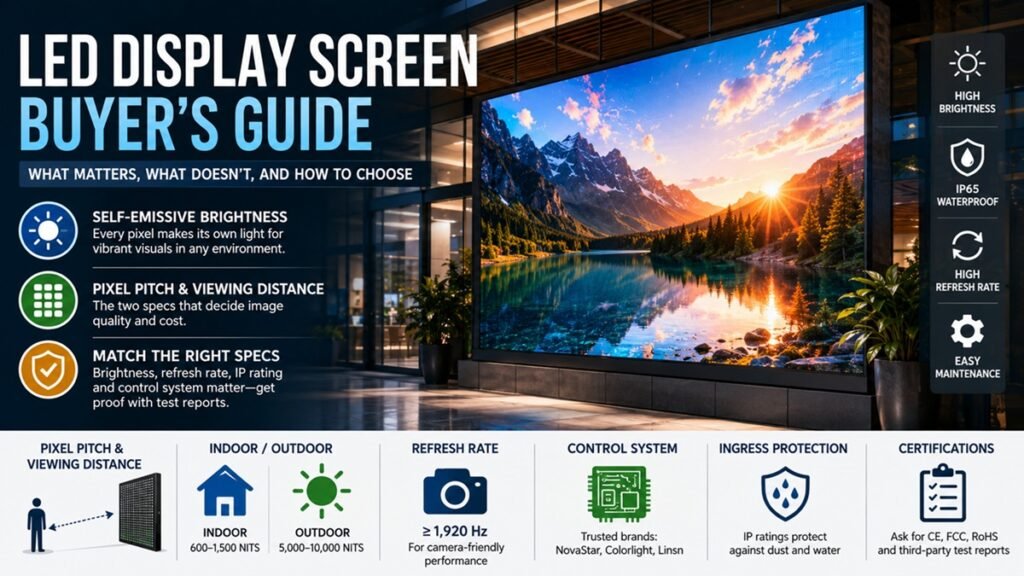
- An LED display screen is self-emissive: every pixel makes its own light, so it stays readable in bright rooms and direct sunlight.
- Pixel pitch and viewing distance are the two specs that decide image quality and cost — settle these before anything else.
- Match brightness, refresh rate, ingress protection, and control system to where the screen will actually be used, and ask suppliers for third-party test reports.
If you’re buying an LED display screen for the first time — for a lobby, a storefront, a stage, or an outdoor billboard — the spec sheets can feel overwhelming. This guide covers the handful of decisions that actually matter, in plain terms, so you can brief a supplier with confidence and avoid paying for features you don’t need.
What an LED display screen actually is
Unlike an LCD, which shines a backlight through a panel, an LED display is built from thousands of tiny light-emitting diodes, each producing its own red, green, or blue light. Combine those sub-pixels and the screen can reproduce any color. Most indoor screens use surface-mount (SMD) LEDs; finer-pitch and premium screens increasingly use chip-on-board (COB) packaging for durability; older or very bright outdoor screens may still use larger DIP LEDs. Because the picture is self-emitting, LED screens reach brightness levels other display technologies can’t — which is why you see them on billboards and stadium scoreboards.
Indoor vs. outdoor: the first decision
This single choice drives most of the others. Indoor screens prioritise resolution and are typically rated around 600–1,500 nits of brightness, which is plenty for controlled lighting. Outdoor screens have to compete with sunlight and survive weather, so they’re usually much brighter (often 5,000–10,000 nits) and sealed against dust and rain. If a screen will live outside, confirm an appropriate ingress-protection (IP) rating and ask how the cabinet manages heat and drainage.
Pixel pitch and viewing distance
Pixel pitch is the distance, in millimetres, between the centres of two neighbouring LEDs. A smaller pitch (e.g. P1.5) packs in more pixels for a sharp image up close but costs more; a larger pitch (e.g. P10) is cheaper and looks fine when viewers stand far away.
A useful rule of thumb: the minimum comfortable viewing distance in metres is roughly equal to the pixel pitch in millimetres. Treat the table below as a starting estimate, not a hard rule — the ideal distance also depends on your content and resolution.
| Pixel pitch | Typical use | Comfortable viewing distance (approx.) |
|---|---|---|
| P1.2–P1.8 | Control rooms, broadcast, close-up retail | from ~1.5–2 m |
| P2.5–P4 | Lobbies, meeting rooms, indoor stages | from ~3–4 m |
| P6–P10 | Outdoor signage, stadiums, billboards | from ~6–10 m |
What else to check before you buy
Brightness control — for any screen near windows or outdoors, an automatic brightness sensor saves energy and prevents harsh glare at night.
Refresh rate — if the screen will ever appear on camera (broadcast, live events, virtual production), insist on a high refresh rate (1,920 Hz or higher) to avoid scan lines and flicker on video.
Control system — the sending and receiving cards run the screen. NovaStar, Colorlight, and Linsn are the established brands; ask which one your supplier uses and whether spares are easy to source.
Serviceability — front-access maintenance lets a technician swap a faulty module without dismantling the whole wall, which matters in tight installs.
Certifications — ask for safety and EMC marks (CE, FCC, RoHS) and, for larger projects, third-party test reports from accredited labs such as TÜV, SGS, Intertek, or CEPREI.
A quick way to spec your screen
Before you request a quote, answer four questions: How close will the nearest viewer be? Is it going indoors or outdoors? Will a camera ever film it? And what’s your budget over the screen’s full lifespan, not just the purchase price? A panel that’s cheap upfront can cost more later if it’s dim, hard to service, or short-lived. Quality screens are often rated at around 100,000 hours, but real longevity depends on the panel and how well it’s maintained.
FAQ
How long do LED display screens last? Many are rated at roughly 100,000 hours to half-brightness, though actual lifespan varies with usage, environment, and maintenance.
Will I see individual pixels? Only if you stand closer than the pitch was designed for. Choose the pitch around your real viewing distance and the image will look seamless.
Is a higher refresh rate always worth paying for? Mainly if cameras will record the screen, or for fast motion. For static signage viewed by the human eye alone, a standard refresh rate is fine.
